
Ideas for better growth
The Festive Sale Website Checklist
Chris Content · · 5 min read
A four-week plan for festive and seasonal sale traffic: capacity, honest offers, checkout resilience, support coverage, and a wind-down that keeps trust intact.
A festive sale multiplies whatever your site already is. If checkout is fragile, it fails under load. If delivery promises are vague, support drowns. If your offer is confusing, the discount is spent on refunds.
This is a four-week plan for arriving at the sale with a site that holds.
Four weeks out: audit and load
Performance. Measure the pages that will take the traffic - home, top categories, best-selling products, cart, checkout - on a mid-range phone with a throttled connection. Remove any script that is not earning its weight. Our page speed guide covers the method.
Capacity. Confirm with your hosting and payment providers what your ceiling is. Ask specifically about concurrent checkout throughput, not just page views.
Third parties. Every widget, tag, and embed is a dependency that can fail under load. List them and decide which you would disable if the site slowed down. Write the list now, not during the sale.
Inventory data. Confirm stock counts are accurate. Overselling during a festive sale creates cancellations, refunds, and reviews that outlast the campaign.
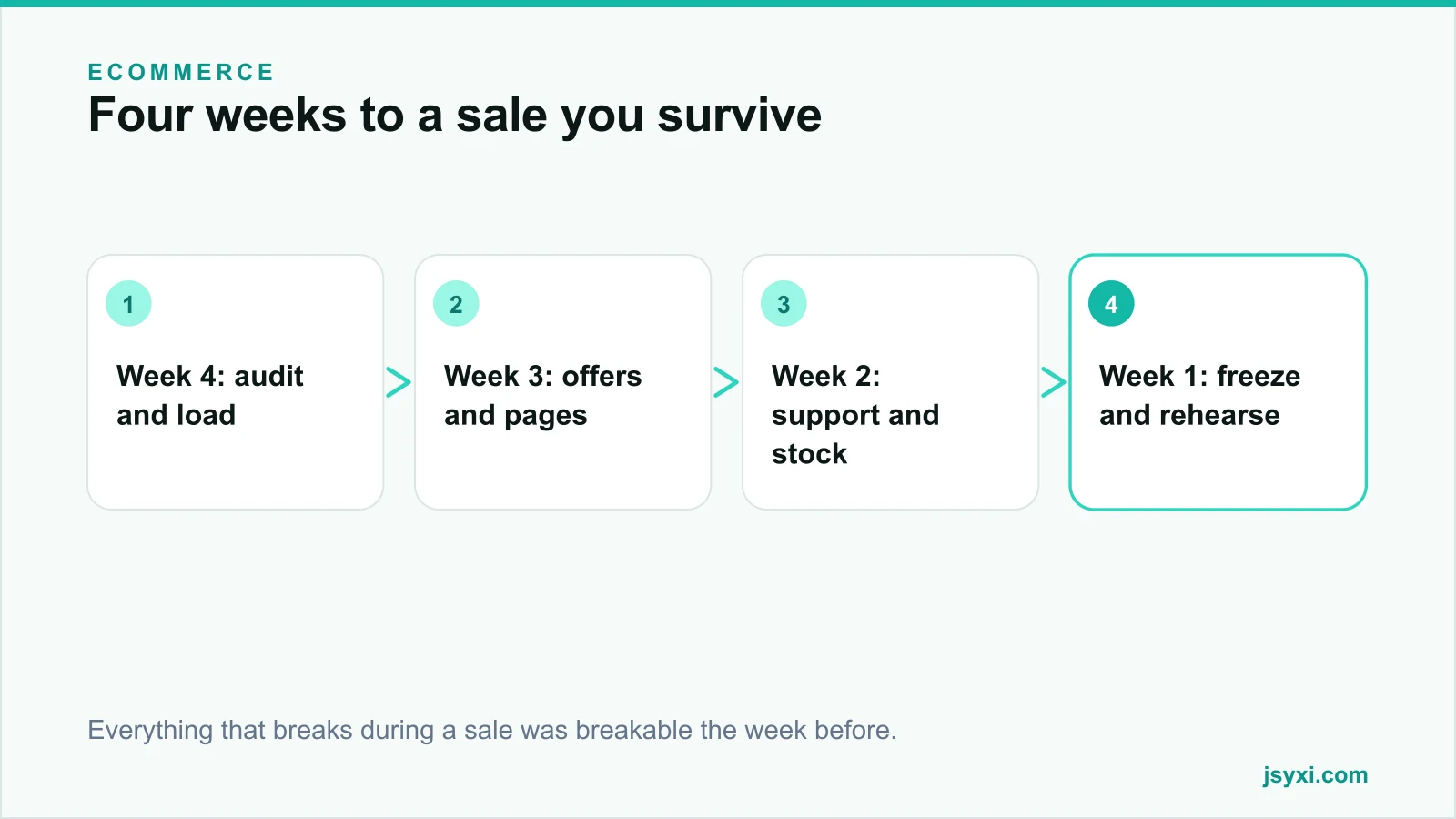
Three weeks out: offers and pages
Make the offer unambiguous. Write the exact terms:
- What is discounted and what is excluded
- Whether it stacks with other offers
- Minimum order value, if any
- Start and end date and time, with the timezone
- Whether it applies to already-reduced items
Ambiguity here becomes support volume later.
Price honestly. If you show a reference price, it must be a price you actually charged recently. Inflating a "was" price to make a discount look bigger is a consumer protection issue in most markets and is easy for customers to check.
Build the sale pages early. Category pages, landing pages, and banners should be built and reviewed now, published later. Set them up so switching them on is a configuration change, not a build.
Prepare the countdown honestly. A Countdown Timer to a real deadline creates legitimate urgency. It must expire into the correct state and must never restart. See honest urgency.
Two weeks out: support and logistics
Delivery promises. Publish realistic cut-off dates for delivery before the festival. Under-promise. A customer who receives an order early is delighted; one who receives it late writes a review.
Support coverage. Decide who is on duty, on which channel, at what hours. Publish those hours with a Business Hours widget so expectations are set, and give an out-of-hours route.
Prepare the answers. Write canned responses for the ten questions you will definitely receive: offer terms, delivery dates, payment failures, order changes, cancellation, returns during sale, cash-on-delivery availability, stock queries, invoice requests, and exchange rules.
Set up the FAQ. Publish those same answers on the sale page with an FAQ Accordion. Every question answered on the page is a support contact avoided.
Returns policy for sale items. Decide and publish it. Silence here produces disputes.
One week out: freeze and rehearse
Code freeze. Stop shipping changes that are not sale-critical. Most sale-day incidents come from a change made two days before.
Rehearse the full journey. On a real phone:
- Browse, add to cart, apply the offer, check out, pay
- Deliberately fail a payment and retry
- Test cash on delivery if you offer it
- Test with an ad blocker enabled
- Test as a guest, not just as a logged-in admin
Check the sticky elements. Promo bars, chat launchers, cookie banners, and announcement bars stack up during campaigns. Confirm nothing covers the pay button with the keyboard open. See our mobile checkout checklist.
Set up monitoring. Know within minutes if checkout errors spike, payment success rates fall, or the site slows. Decide who is watching and how they will be alerted.
Prepare a rollback. Know how to turn the sale off, revert prices, and disable heavy widgets quickly.
During the sale
- Watch payment success rate as your primary health metric, not traffic
- Keep the offer terms visible on the sale page, not only in the ad
- Update stock status promptly; a sold-out item shown as available generates cancellations
- Answer support quickly - during a sale, response time is the experience
- Resist adding new offers mid-campaign; it confuses customers and your own team
After the sale
The wind-down decides whether the sale built or spent trust:
- Expire everything cleanly. Timers, banners, and prices must revert together. A dead countdown or a stale banner is a credibility cost.
- Honour the promises. Ship within the stated window, or communicate early if you cannot.
- Keep support staffed for the return and exchange wave, which arrives one to three weeks later.
- Write down what broke. The list is the plan for next time.
- Measure the real outcome - margin after discounts, returns, and support cost, not gross sales.
Common mistakes to avoid
- Shipping changes during the sale. Freeze early.
- Inflated reference prices. Customers check, and so do regulators.
- Vague delivery promises. They become the top support topic.
- Leaving banners live after the sale ends. It signals nobody is minding the site.
- Measuring gross revenue only. A sale can grow revenue and shrink profit.
Frequently asked questions
When should festive sale preparation start?
About four weeks out for a small store: audit and performance first, then offers and pages, then support and logistics, then a freeze and rehearsal in the final week.
How do I stop my site from slowing down during a sale?
Reduce third-party scripts before the sale, confirm capacity with your host and payment provider, cache aggressively, and keep a list of non-essential widgets you can disable if performance degrades.
Can I use a countdown timer for a festive sale?
Yes, for a real deadline. It must count to an actual end time, expire into the correct state, and never restart. Fake urgency is noticed and remembered.
What should happen the day after the sale ends?
Prices, banners, and timers revert together; delivery promises are honoured or updated proactively; support stays staffed for returns; and you write down every failure while it is fresh.
Next steps
Put the four-week plan in a calendar, assign an owner to each block, and rehearse a full purchase on a real phone including a failed payment. The rehearsal finds more problems than the audit.
Start free and get your sale pages ready before the traffic arrives.